
Why Gaming Needs Overlay Captions, Not a Separate Captioning Window
Windows 11 Live Captions. Otter.ai. Your phone's speech-to-text. Monitor-based captioning devices. There's no shortage of tools that turn speech into text in 2026.
So why do gamers need something different?
Because gaming is the only context where looking away for one second can get you killed.
Traditional captioning solutions weren't designed for gaming. They display text in a separate window, on a different screen, or in a system-level banner that sits outside the game. For movies, meetings, and phone calls, that's fine. For gaming, it's a fundamental design failure.
The Problem: Eyes Off Screen = Death
Every game genre has moments where a split-second of inattention costs you. If your captions live anywhere other than directly on top of your game — overlaid on the actual gameplay area — you're forced to choose between reading what your teammate said and reacting to what's happening in the game.
That's not accessibility. That's a different kind of exclusion.
Let's look at specific scenarios:
The FPS / Tactical Shooter case:
"Enemy behind you!" — but you were reading a caption on your second monitor
In Valorant, CS2, or Rainbow Six Siege, callouts happen in real-time during gunfights. Your teammate says "They're pushing B site." - If you glance at a separate caption window, you've already lost the angle. The caption needs to appear directly in your field of view, over the game, at the same time as the information matters.
The RTS / Strategy case:
"They're rushing your expansion" — while you're managing three base locations
In StarCraft II or Age of Empires, your attention is already split across the minimap, resource counters, unit groups, and multiple base locations. Adding a separate captioning window to that cognitive stack is absurd. An overlay caption that appears briefly near your focus area integrates into the existing information flow.
The MMO / Raid case:
"Soak the puddle!" — during a 20-person raid encounter with screen-wide mechanics
World of Warcraft mythic raids, FFXIV savage content, or Destiny 2 raids demand constant attention to boss mechanics, positioning, health bars, and cooldown timers. Raid leaders call out mechanics in voice chat. If those callouts appear in a separate window instead of directly over the game, the player has to choose between reading the callout and dodging the mechanic that callout is warning about.
The Battle Royale case:
"Squad pushing from the east, 150 meters" — while you're looting under pressure
In Apex Legends, Fortnite, or PUBG, the ring is closing, you're mid-loot, and your teammate pings a threat. Looking away from the game screen - even briefly - means you miss the visual cue of movement, the muzzle flash, or the direction indicator. Captions must be where your eyes already are.
Time-Critical Challenges
"Jump now!" — during a precision platforming sequence with a 0.5s window
Speedruns, timed puzzle rooms, co-op platformers like It Takes Two - anywhere precise timing matters, any eye movement to an external caption source adds latency that the game's mechanics don't forgive. The caption needs to be native to the viewport.
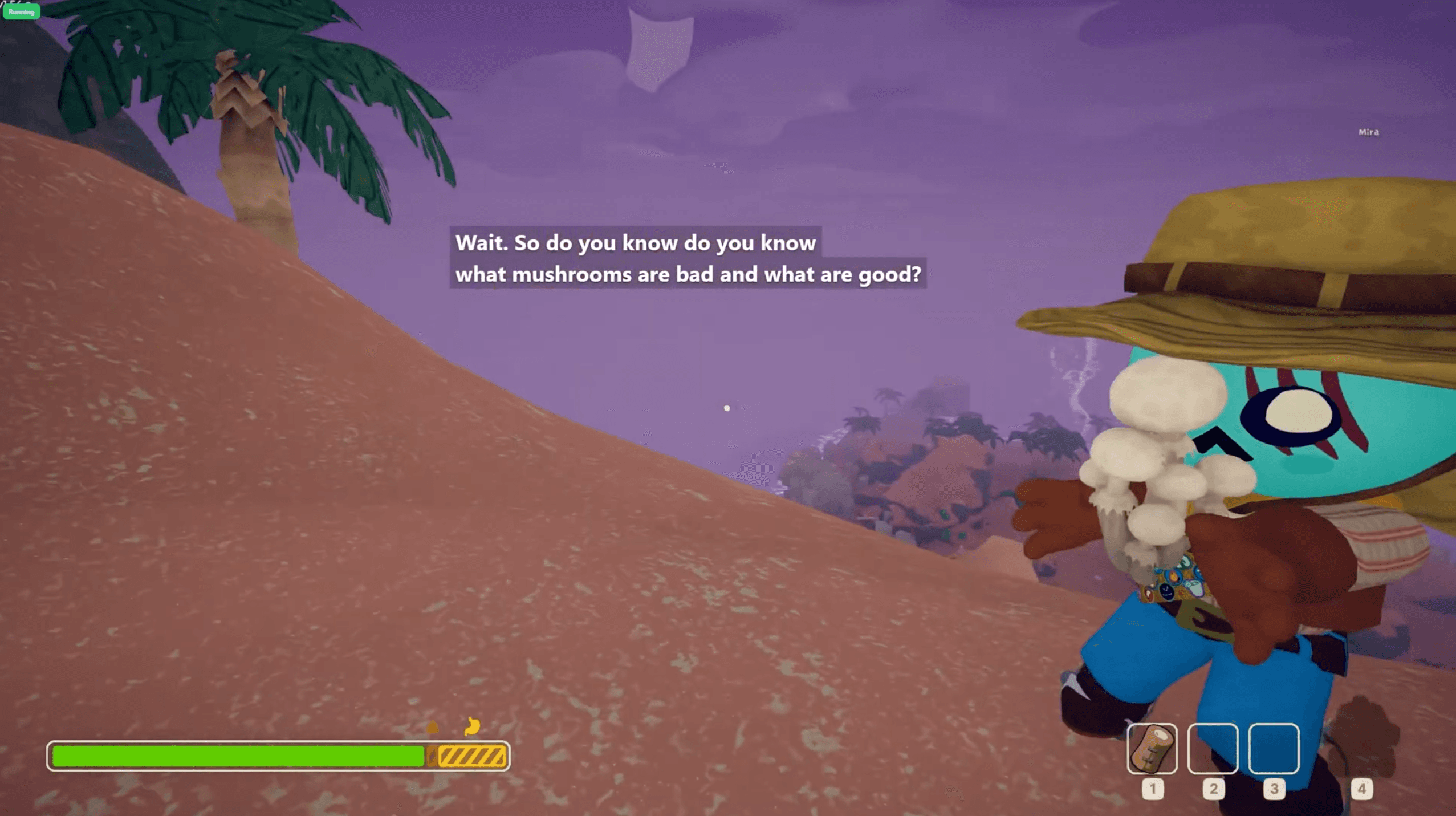
In the following screenshot, you can see the author playing the game PEAK while using CaptionsRush, communicating with teammates. One of them explains how to determine whether it's okay to consume the resource. This is a classic example of critical communication that can be done over VoIP much more easily than written text.
What Traditional Solutions Get Wrong
Feature | Windows 11 Captions | External Apps | Gaming Overlay |
|---|---|---|---|
Displays over fullscreen games | ❌ No * | ❌ No | ✅ Yes |
Works in exclusive fullscreen | ❌ No | ❌ No | ✅ Yes |
Positional flexibility | ❌ Top or bottom bar | ❌ Separate window | ✅ Anywhere on screen |
Stays visible during intense gameplay | ❌ Can be obscured | ❌ Requires alt-tab | ✅ Always on top |
No eye-off-screen penalty | ❌ Partial | ❌ No | ✅ Yes |
Designed for real-time callouts | ❌ No | ❌ No | ✅ Yes |
* Windows 11 Live Captions can technically appear in windowed/borderless mode, but they render as a system UI element above or below the game — not integrated into the viewport. In exclusive fullscreen (which many competitive players use for input lag reduction), they don't appear at all.
It's Not Just About Position — It's About Design
Even if you could drag a traditional caption window over your game (which most don't allow in fullscreen), the design still wouldn't work. Gaming overlay captions need specific characteristics that general-purpose captioning ignores:
Semi-transparent background. A solid white caption bar blocks gameplay. Overlay captions need a translucent dark backdrop that's readable without obscuring the game underneath.
Speaker identification. In a meeting, you can see who's talking. In a game, you need the caption to tell you — especially in a 5-player squad where four people might be calling out simultaneously.
Timed fade-out. Traditional captions persist or scroll. Gaming captions should appear, stay long enough to read, and disappear — they're transient information, like a HUD element, not a transcript.
Customizable position. Different games have critical UI in different screen locations. You need to place your captions where they don't overlap your crosshair, minimap, health bar, or ability cooldowns. A fixed-position system caption can't adapt to each game's layout.
Low latency rendering. A caption that arrives 2 seconds after the callout is useless. Gaming captions need to appear in real-time with sub-second latency — the same expectations we have for in-game HUD elements.
Who This Affects
This isn't just a deaf/hard-of-hearing issue — though that's the primary audience. Overlay captions also help:
Players in noisy environments — gaming in a living room, LAN parties, gaming cafes — where you can't hear voice chat clearly over ambient noise.
Non-native speakers — reading a fast English callout is easier than parsing it through accents and compression artifacts in real-time VoIP audio.
Late-night gamers — playing on low volume or muted speakers so you don't wake your household, but still need to follow team communication.
Streamers and content creators — overlay captions serve double duty as visible, readable comms for viewers watching without sound.
The Bottom Line
Gaming is the most time-sensitive, attention-demanding context for captioning that exists. It deserves a captioning solution built specifically for it — not a meeting transcript tool repurposed for a screen where milliseconds matter.
That's why we built CaptionsRush as a direct game overlay from day one. Not a separate window. Not a system notification. A real-time, low-latency, semi-transparent caption layer that lives on top of your game — exactly where your eyes already are.
Because accessibility that makes you look away from the thing you need to see isn't really accessibility at all.
CaptionsRush — Real-time voice captions for gamers captionsrush.com · @OrenLandex